For the independent wellness professional whose hands are always full — Sentry Scheduler answers every booking text in your style, books it into your calendar, and screens who's coming before they reach your door. You stay in control of every step.
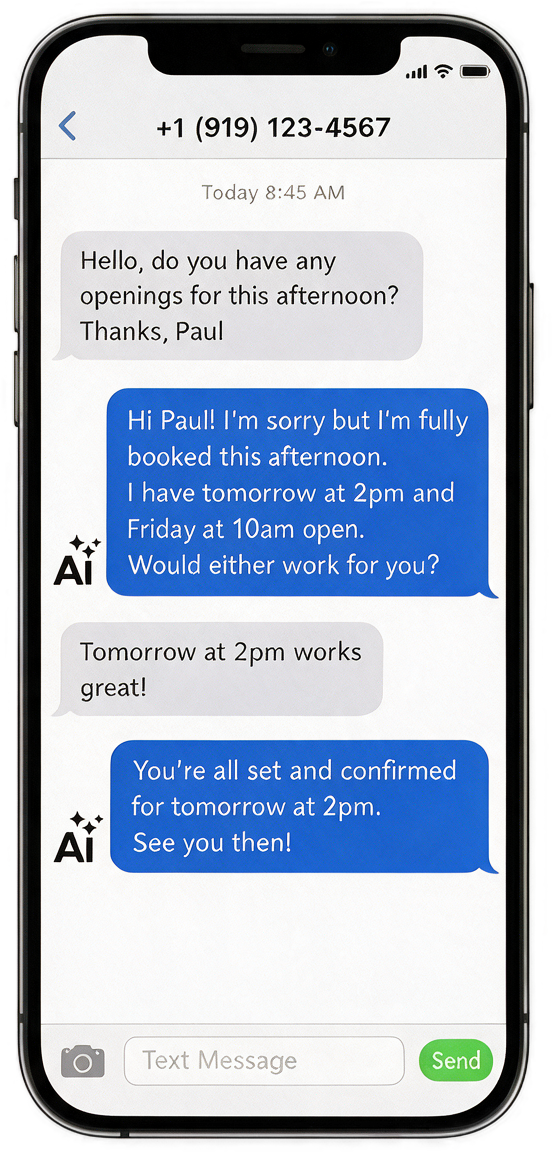
Running solo means every booking text competes with the client on your table — and every new face is someone you couldn't screen. Here's what Sentry takes off your plate, starting day one.
Every time you're hands-on with a client, your phone is ringing and texts are piling up. New clients who don't hear back move on — and that revenue walks out the door.
Clients text at 9pm expecting a quick reply. Without one, they're booking with someone else by morning. Sentry responds instantly — even while you sleep.
You work in your own space and you've handed your address to people you couldn't screen. You shouldn't have to choose between the booking and your safety.
No technical experience needed. No staff required. Here's how Sentry Scheduler works for you around the clock.
Welcome
Free yourself from the administrative burdens.
“Before Sentry Scheduler, I was losing new clients every week just because I couldn't answer my phone mid-session. Now my schedule fills itself.”
Sarah M.
Certified Massage Therapist, San Diego, CA
“I used to spend my nights catching up on booking questions and requests. Now I spend them doing what I want, uninterrupted. Setup took 15 minutes.”
Amber S.
Independent Wellness Professional, Austin TX
“I had a client book at 11pm and show up the next morning — I didn't lift a finger and was notified through every step of the process. That's when I knew this was different.”
Mia
Independent - Orange County, CA
Every plan starts with a 7-day free trial. No charge today — we remind you the day before it ends, and you can cancel anytime.
7-day free trial included
7-day free trial included
7-day free trial included
Sentry Scheduler is an AI text-messaging assistant built for independent professionals. It answers client texts, books appointments, and screens new clients on your behalf using a dedicated business phone number.
After signing up you complete an 8-step setup: profile, location, services, availability, AI personality, a test chat, choosing a plan, and finishing. Once you subscribe you get your Sentry number and go live.
It is a dedicated phone number we provision for you after you subscribe. Clients text this number, and the AI replies as your business. You can request a new number from Settings if needed.
Basic is $29/month, Pro is $59/month, and Premium is $149/month. Every plan includes a 7-day free trial, your Sentry number, AI texting, and automated scheduling.
Basic covers up to 50 clients and 500 outbound messages/day with manual client screening — you approve each new client yourself. Pro adds automatic reference-based screening, unlimited clients and messages, and Google, Outlook, and Apple calendar integration. Premium includes everything in Pro plus concierge onboarding and priority support with a 2-hour response.
A new account can finish setup and use the Test Assistant to preview the AI, but live SMS and scheduling start once you subscribe to Basic, Pro, or Premium (each includes a 7-day free trial).
Go to the Clients page and click "Add Client," then enter their name and mobile number. You can also let clients text your Sentry number directly and the AI will create them automatically.
When a client texts in, the AI reads your availability, services, and pricing, then replies, books the slot, and confirms the time. You can review or override any reply from the Conversations page.
Sentry automatically tracks consecutive cancellations on confirmed appointments. After 2 back-to-back cancellations, the client is placed on probation — you receive a notification, and any future booking requests from that client are held for your manual approval before they're confirmed. If a probation client cancels a third time, they are automatically blocked. A client is restored to good standing once they complete a session successfully.
From the Schedule page, open any confirmed appointment and click "Mark No-Show." This flags the appointment and immediately places the client on probation — you'll receive a notification, and all future booking requests from that client will require your manual approval before confirming. The no-show count is visible on the client's profile. Once the client successfully completes a future session, they are automatically restored to approved status.
Yes. Under Settings → AI Settings you can set the tone (Casual, Warm-Professional, Fun & Flirtatious, or Formal), toggle emoji, add sample phrases, and write custom instructions.
In Settings → AI Settings you can save question-and-answer pairs the AI will reuse, so it answers recurring client questions exactly how you want.
It escalates the conversation to you and pauses its own replies until you respond. You get a notification, plus reminders if it stays unanswered.
On Basic, the AI asks new clients for a reference, a photo ID, or LinkedIn plus a work email, and you approve or deny them manually. On Pro, the AI texts references automatically and can auto-approve clients who pass.
Open the conversation and switch it to Manual mode. The AI stops replying so you can text the client directly, and you can hand it back anytime.
You can set an after-hours auto-reply, or let the AI keep handling new, vetting, and approved clients around the clock based on your settings.
Your exact address is never sent automatically until you allow it. In Settings → Notifications you can auto-share with approved clients a set time before the appointment (1, 2, 24, or 48 hours), and you can also share manually from the Schedule.
Go to Settings → Integrations and connect Google or Outlook. After authorizing, your busy times sync automatically (every few minutes) and block those slots from booking. Calendar sync is a Pro feature.
Basic includes 500 outbound messages/day. After the cap, inbound texts are still saved and you're alerted, but the AI pauses replies until the next day. Upgrading to Pro removes the daily limit.
Replying STOP unsubscribes them, HELP returns help info, and START re-subscribes, per carrier compliance rules. The AI handles these automatically.
The bell in the top bar and the Notifications page show escalations, new clients, booking requests, vetting actions, and safety flags. You can choose push, SMS, and email alerts in Settings → Notifications.
Go to Settings → Billing and click "Manage Subscription" to open the Stripe portal, where you can upgrade, downgrade, or cancel. Changes take effect at the end of the current billing period.
Sentry Scheduler books while you're not on the clock. Set up in under 10 minutes — free for 7 days. No contracts, no staff, no stress.
